Engineering workshop #5: Principal Stresses
22 June 2010
Process type: Design
Fresh from the London Marathon (completed in 3:16:34), Bob Johnson continues his engineering basics with a look at principal stresses
This month we turn our thoughts to the idea of Principal Stresses – these are simply the direct stresses, at arbitrary angles, such that NO SHEAR STRESSES act with them. In a very simple structure (say a bar aligned with the global X-axis) the global direct stresses may exist without shear stress so these are Principal values already. In general however the Principal Stresses will occur at arbitrary angles (to the global) and we can compare Cartesian Stresses and Principal Stresses in the following manner:
Cartesian Stress: Tensor with three direct and three shear stresses in GIVEN directions
Principal Stress: Vector of three Principal Stresses acting in ARBITRARY directions
The Principal Stresses are calculated from the cubic formula (eek sorry):
p3 – I1 p2 + I2 p – I3 = 0
Where the above “I” values are the stress invariants (quantities that don’t change as the stress field is rotated) and I1 is given by the sum of the direct stresses (a nice check for later on). The above formula will (always!) yield three Principal Stress values and we usually denote the most tensile value as “P1”, the most-compressive as “P3” and the one in-between as “P2”. Once we have the three Principal Stress values we can deduce the directions they exhibit (usually as unit vectors in the global system). You should envisage the Principal Stresses as three direct stresses mutually perpendicular to each other (with no shear stress defined on these planes). Let’s look at an example:
{ figs.1 and 2} show a tubular member (or “header” - imensions 300mm OD x 10mm WT) with a minor member (or “branch” - dimensions 100mm OD x 10mm WT) “pulled-through” from the side wall of the
main member. We will need to assume that the tube is annealed such that any manufacturing stresses are removed before we apply some external load.
The tubular member is then subjected to a torque of 320E6 Nmm at one end (Z+) and an opposite moment/torque at the other end. The tubular member is shown as a “free-body diagram” because it is under force and moment equilibrium (we covered this in an earlier article). The applied load is shown on { figs.1 and 2}.
The loading induces a state of pure shear in the member (there is NO hoop stress, axial tension, bending stress and so forth and so on). Check yourself but a simple hand calculation (shear stress = Tr/J) shows that the shear stress on the outer diameter of the main tubular will be 250MPa (away from the penetration).

Fig.2
Trust me but theory dictates that the resulting Principal Stresses will be: P1 = +250MPa; P2 = 0 MPa; and P3 = –250MPa in areas away from the influence of the branch. The subsequent principal directions occur at +45 and –45-degrees to the main axis of the tubular. In other words the applied torque (twist) has resulted in pure tension at 45-degrees one way and pure compression at 45-degrees the other way. These two Principal Stresses are helical in nature and parallel to the outside surface of the tube. The third Principal stress is normal to the surface and, for equilibrium with the applied pressure (there isn’t any!), must be zero. A state of (two-dimensional) plane-stress exists on the OD of the tube (as one of the Principal values is zero).
An approximate Finite Element Analysis model has been constructed in order to prove the theory as stated above. (We will return to the accuracy of such an analysis in future articles). P1 and P3 stress contours local to the pulled-through brace are shown on { fig.1} while the associated principal directions are shown in { fig.2}. It is apparent that the principal directions predicted by the FEA are in the plus-45 and minus-45 directions and the resulting tension/compression is consistent with the direction of the applied torque.

Fig.3
{ fig.3} shows a detail view of the peak P1 stress predicted on the internal blend between the main header and the minor brace. The P1 direction is seen to have changed to the circumferential direction around the brace. Note that any cracking/tearing starting from this peak location will tend to be in a direction NORMAL to the P1 direction – a useful plus-point for the use of Principal Stresses. The predicted Cartesian Stresses at the P1 peak are as follows:
Sxx = 311.3; Syy = 619.0; Szz = 930.5; Sxy = 271.2;
Syz = 565.1; Szx = –24.2MPa
And the resulting Principal Stresses are P1 = 1,381.5; P2 = 473.8 and P3 = 5.6MPa. Note that the P3 stress is normal to the surface in this case (near zero).
Finally, a little bit of homework: are you happy that the first stress invariant does not change?
R P Johnson BSc MSc NRA MIMechE CEng – technical director, DAMT Limited
Comments on this article:
The light fantastic
18 June 2010
Process types: Collaborate, Design and Manufacture
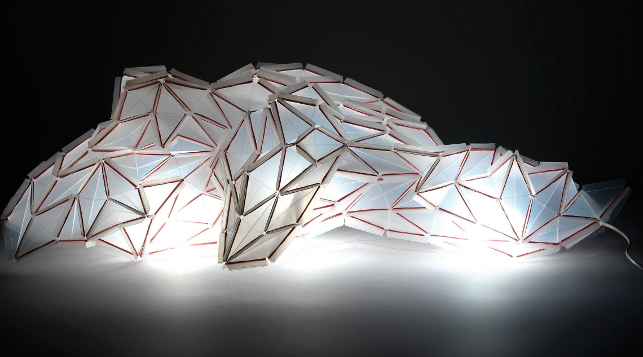
Alice Gruhle, a student at Germany’s Offenbach University of Art and Design, was given the opportunity to produce a version of her “Polymorph” lamp. With the help of the injection moulding specialist, Proto Labs, she was able to create and manufacture the modular parts she had designed
As designers sometimes don’t work with commercial considerations in mind, it is often a valuable experience for students when design colleges provide practical experience to help them understand the compromises and challenges of commercialising ideas.
Shine on you crazy diamond: Alice Gruhle’s innovative lamp concept made of diamond-shaped modules
HfG Offenbach University of Art and Design in Germany succeeded in doing just that by giving its students an assignment to design a utility item that would meet all the requirements of series production.
Initially, the students were only able to use scissors, paper and glue to create conceptual models of their ideas. However, as the project developed, one successful student would have access to the very latest injection moulding technology to produce a working model of their design.
At the invitation of project supervisor, Professor Frank Zebner, the seminar event was supported by master toolmaker Jörg Müller, who is also the technical sales manager in Germany for Protomold, the specialist injection-moulding service from Proto Labs.
Jörg was on hand throughout the project to advise students on ways to apply the rapid injection moulding process to their design process.
The seminar concluded with Professor Zebner and Mr Müller selecting the best design for a short production run to be made using polypropylene: the winning designer was Alice Gruhle who had designed a lamp concept made of diamond-shaped modules.
Enter the fold
The seminar began with an investigation into different folding techniques. The objective was to construct as many different shapes as possible using both sober symmetrical grids and playful forms resembling those made by origami artists.
_RF.jpg)
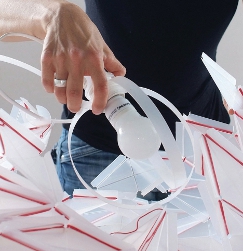
Alice Gruhle and her Polymorph lamp
The participants were then encouraged to draw on this collection of shapes to come up with their unique product design.
Initially, Alice Gruhle experimented with a grid of squares, each divided into four triangles of equal size. She then transferred the grid onto a thin sheet of polypropylene, cut out the triangles and then joined them back together in their original arrangement with tape so they could be folded along the dividing lines.
It was at this point in the project that Alice benefited from the knowledge and experience of Mr Müller as he pointed out that it would not be technically possible to make a single working part with so many folding hinges using the injection moulding process. He explained that from his experience, the plastic would cool down before it could completely fill out the tool.
With this in mind, Alice kept on experimenting by stretching the squares into diamonds. To join these diamonds together she then added wings that could flap back and attach to the long-sided wings of the neighbouring module.
Clipped wings
With her paper prototype she used simple paper clips to join the wings but when it came to the modules cut from sheets of polypropylene, she chose ordinary rubber bands to make the connections.
Alice explained: “You can produce more complicated structures using diamond-shaped modules than you can with comparatively rigid squares. It is possible to, not only construct regular and closed bodies from them, but also open and chaotic structures. This really appealed to me!”
Bright ideas
For the university’s end-of-term show, Alice produced 500 modules and joined them to create a single sculpture. “I spent an entire night working on it,” she recollects.
A low-energy bulb protruded up from a base and glowed inside the body of the lamp. This made the lamp stand out from its surroundings and the effect was particularly impressive in the dark as the light seeped through the hinges where the translucent material was thinner.
Then, by using ProtoQuote and ProtoFlow analysis, Alice worked on her design so that the module would be optimised for rapid injection moulding production.
She has since received her first delivery of injection moulded modules and is very pleased with the outcome. “It’s really like Lego,” she says.
“Every part must be right so that they all fit together perfectly.”
In comparison to the early modules, milled using the university’s own facilities, the injection moulded versions are stronger as the process allowed them to be 0.6mm thicker. The notches on the tips of the diamonds are square, rather than round, and the folding hinges could be bent in both directions – not just in one as was the case with the prototype.
It was at this stage that Alice also changed the rubber band concept for connecting the diamonds together; finding that when they wrapped two or three times around the wings they became brittle. She replaced these with perfectly fitting silicon rings.
Alice has called her design ‘Polymorph’ and has since used some 150 injection moulded modules to create a cocoon-like hanging lamp. Her design has subsequently been featured in German design magazines and was showcased at Euromold last December.
Comments on this article:
The Autodesk 2011 Launch
11 June 2010
Process types: Collaborate, Design and Simulate
Every Spring Autodesk unleashes more software than it takes to fill the Royal Albert Hall. Martyn Day and Al Dean report
There was a time when Autodesk was accused of being a one-product company. While AutoCAD was important to the company, and still is to some degree, the past ten years have seen exponential growth in the number of products the company offers, either through acquisition or in-house development.
That is not to say AutoCAD is not important, it’s still a global industry standard and its little brother, AutoCAD LT, still sells by the bucketload. This means that on global launch day, despite having very popular 3D design systems such as Inventor and Revit, AutoCAD and its flavoured version still make headline news. In fact, to describe AutoCAD as a 2D system is disingenuous, as over the past three years substantial 3D capabilities have been added, making AutoCAD a very capable, generic 3D modeller, compatible with Autodesk’s other 3D systems.

Inventor 2011 features much improved real time lighting control
The primary 2011 product launch was held in downtown San Francisco. Autodesk CEO Carl Bass and senior vice president of platform solutions and emerging business, Amar Hanspal were masters of ceremonies for the event and simultaneous web broadcast. AutoCAD resides in the platform group and so sat central stage, before quick demonstrations of Inventor 2011.
AutoCAD’s new features
The first piece of good news is that DWG is staying the same, so there is no file format hassle with this upgrade. The second piece of news is a tad confusing, as in this release AutoCAD clearly becomes a fully featured 3D modelling tool, offering very powerful surfacing commands for NURBS and procedural surfaces. Last year’s parametric capabilities have been enhanced, such as the ability to infer constraints as well as driving some underlying 3D geometry.
Another great addition has been the inclusion of a powerful point cloud engine, allowing highly accurate laser scans of products or buildings to be brought into the native AutoCAD environment. Typically tools that do this well cost thousands of pounds. This will be useful for reverse engineering, quality inspection and building/road design. Of course the usual array of 2D enhancements to appeal to the core AutoCAD community were also there and, as usual, AutoCAD LT only got the relevant subset of these 2D updates.
Convergence
One of the lesser-known stories behind this batch of releases is the engineering work that has gone on behind the scenes. Autodesk has had two long term objectives. One, to get the products to share data better and two, to standardise the software components. To this aim, the 2011 products represent a significant delivery on longstanding development goals.


Moldflow is used to discover the flow and orientation of fibres within a glass filled polymer. The data from the previous simulation is then used to determine the structural performance of the parts
Internally know as the AIRMAX initiative (AutoCAD, Inventor, Revit and 3ds MAX), these 2011 products now share the same graphics engine. While this provides a great boost in performance for products such as Revit, the standardisation also means that materials have the same look and feel for predictable results.
The inclusion of a standard material library with each application means that projects will look exactly the same in all products, producing fewer surprises when collaborating or mixing and matching Autodesk applications. This also reduces the development and quality effort for Autodesk’s software teams as the portfolio of products continues to swell. It will also be useful should Autodesk acquire new products in the future.
Subscription
As we all know these are challenging times and in the CAD market every vendor has seen sales drop quite dramatically. That makes Autodesk’s already substantial subscription business all the more important to maintain.
Traditionally Autodesk has never really offered much beyond the next release for the subscription fee but in recent years additional functionality has been delivered mid-cycle across its product range. That appears to be the future direction, where Autodesk will offer more ‘perks’ to subscribing customers. Of course, if you are on subscription it helps to know you have the right to download the goodies. It’s amazing, but it seems many users are not aware of what they could have access to.
Channel changes
Accredited resellers of Autodesk products typically only sell products in vertical markets for which they are authorised and even then not all the products that may be available. So an MCAD reseller may have Inventor accreditation but not be able to sell 3ds Max.
To sell and support products, Autodesk has, in the past, made resellers apply for each and every product. Under new regulations, the resellers can sell all the products from each of its verticals. This means that customers need not have multiple resellers to get their specific product suite.

Inventor Publisher offers a range of tools for technical publishing, including the ability to create animated sequences
Manufacturing Solutions
Autodesk’s Manufacturing Solution’s Division is based in Portland, Oregon. To dig deeper into the manufacturing product suite, the company hosted a day of intensive demos for the press, covering everything from Alias-powered conceptual design, through to Inventor modelling, analysis, simulation, publishing and workflow management.
Robert ‘Buzz’ Kross, senior vice president of manufacturing was very upbeat on this particular release, from both a breadth and depth perspective. Inventor not only does what it does well, there are now some really advanced capabilities being delivered by a ‘mid-range’ modelling tool developer.
Autodesk product highlights
Inventor 2011
Inventor 2011 contains one hell of a lot of new functionality which we cover in some depth on page 46, but the highlights range from a dramatically overhauled visualisation engine that offers a pretty photorealistic working environment for 3D, a new frame analysis tool that compliments the existing tools for framework design and a redesigned interface for editing of geometry that places the focus on the model and interaction with the key constituent parts, rather than dialogs and panels.
Inventor Publisher goes live
Previewed on the Autodesk Labs web-site following December’s Autodesk University event, Inventor Publisher is now a standalone application that offers tools for technical publishing. Features include the ability to create animated sequences and step-by-step work instructions.
Alias
This is a product that has been gaining more and more focus in the Autodesk suite. 2011 sees the addition of some core updates that will make life much easier for those already using the system. Good examples include the ability to model across planes of symmetry, which allows the user to ensure a single high quality surface spans that plane.
Previously the user would have to model symmetry spanning surfaces after switching symmetry off – which makes the whole process more efficient. Another is the tools that locate curvature in a surface network. This shows connections between surfaces in terms of position, tangency and curvature continuity and helps users understand how a model is constructed and evaluate areas which need further work to create aesthetically pleasing surfaces.

New tools in Alias help users understand how a model is constructed and evaluate areas which need further work to create aesthetically pleasing surfaces
Sketching gets a focus
Alongside all of the geometry creation tools that Alias brings to the party, there’s also been an interesting slew of releases on the sketching side of things. The last year has seen the release of new versions of SketchBook Pro for both the Apple iPhone and iPad, but alongside this there’s a new product called Alias Sketch. Available as a standalone application on Mac or PC and also integrated within AutoCAD, Alias Sketch differs from the bitmap/paint-led approach of SketchBook Pro and allows users to mix both bitmap/paint style sketching with a set of intelligent vector-based sketching tools. The benefit of the vector-based approach is editability and here the system offers a huge range of options and control methods.
Interestingly, Alias Sketch manages to combine mouse and tablet-driven input methods and is possibly one of the most interesting tools to emerge that truly supports the industrial design concept sketching process. Think, Adobe illustrator with all of the irrelevant bits stripped out of it and replaced with a set of efficient, focussed tools. We’ll be taking a look at Alias Sketch in a forthcoming issue in much more depth so stay tuned.


Manufacturing defects are identified in Moldflow and then visualised in Showcase
Simulation and analysis
This is currently a major focus for Autodesk and in the past few years there has been a huge range of tools acquired and merged into both the core Inventor product and those that surround it. With the 2011 releases there have been significant updates to Moldflow and Algor to name but a few, but the most interesting work being done is in terms of interoperability between these disparate systems.
Take the example of how data can now be passed between Moldflow and Algor when simulating how a glass filled polymer is injected into a mould tool. As part of the simulation, Moldflow can pass information about how the glass particles or fibres in the plastic flow in the part.
This data can then be used as the basis for a simulation within Algor to determine the structural strength of the component based on the orientation of the fibres. While this won’t benefit that many people, it’s a good example of how previously disparate technologies and products are converging into interesting solutions.
Another excellent example of this convergence is the link up between Moldflow and Showcase. Moldflow’s raison d’être is to predict the performance of a mould tool set-up with the idea being that manufacturing defects (sink marks, warps etc) can be eliminated either through redesign or adjustment of the manufacturing parameters.
The problem is that all too often these defects are only displayed in cryptic fringe plots and shaded views that mean very little to the non-technical stakeholders in the product development process. To solve this issue, Autodesk has linked up Moldflow to its visualisation system, Showcase, and users can now see exactly what the effects on the final product would be.