Workstation Specialists WS1400
26 November 2009
Process types: Hardware and Manage
An impressive, near silent entry-level CAD workstation which benefits from the enhanced TurboBoost feature in Intel’s new Core i5 processor. By Greg Corke
| Product | WS1400 |
|---|---|
| Company name | Workstation Specialists |
| Price | £999 |
With the levels of performance offered by today’s multi-core chips, the term ‘entry-level workstation’ is often a bit of a misnomer.
For CAD, virtually all modern workstations are powerful enough for standard 3D modelling tasks and it’s only when you start upping the ante with large assembly modelling, rendering, or simulation that specs need to be stepped up a notch. As tech progresses, yesterday’s ‘mid-range’ soon becomes today’s ‘entry-level’ and by embracing Intel’s new Core i5 processor at the heart of its new WS1400 workstation, this is effectively what Derby-based Workstation Specialists (WS) has done.
Until recently Workstation Specialists used Intel’s Core 2 Duo as its entry-level workstation processor, reserving the Core i7 for its mid-range machines. However, with the introduction of the Core i5 and new generation Core i7 processors, this has changed and WS is now able to boost the performance of its entry-level workstation range, without significantly increasing the price point.
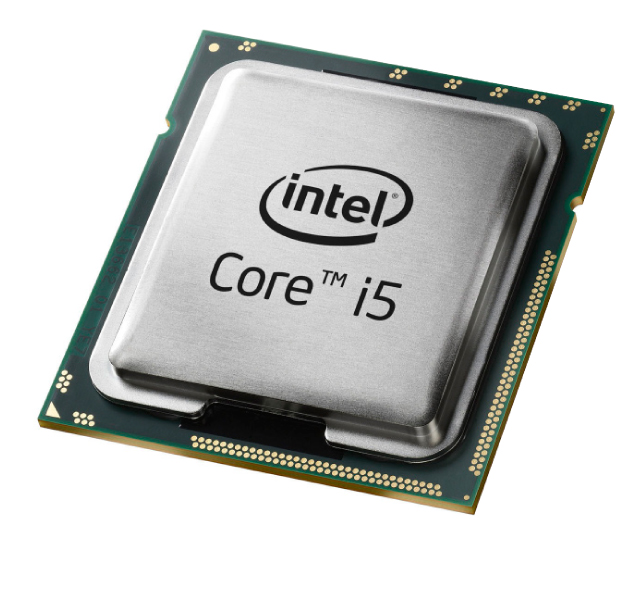
The WS1400 is available with three processor options – the Core i5 750 (2.66GHz), Core i7 860 (2.80GHz) and Core i7 870 (2.93GHz). While the Core i5 750 inside our test machine enables WS to bring the price in just under the £1,000 mark, those that use rendering alongside their everyday CAD work would probably consider an £85 upgrade to a Core i7 860 money well spent. This not only boosts clock speed, but adds support for HyperThreading, which increases performance in virtually all rendering applications. We would expect around a 15-20% reduction in rendering times in 3ds Max when moving from the Core i5 750 to the Core i7 860.
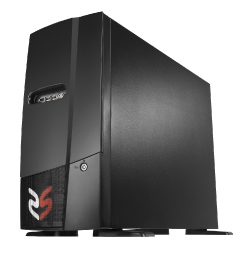
WS recently standardised on a single chassis for all of its workstations, from the entry-level to the high-end, and its machines now have a distinctive look. A front panel hides the DVD tray, but the USB and Firewire ports and headphone and microphone jacks can still be accessed when the door is shut.
The downside of using the same chassis across its entire range is that the W1400 is fairly large for a workstation of its standing, particularly when compared to entry-level machines from the likes of Dell, HP and Lenovo.
Compact, not exactly, but quiet yes. As is typical for most WS machines, the WS1400 is virtually silent in operation, even at full load. From our past experiences, it’s obvious that the tech guys at WS have a good handle on how to efficiently cool a workstation, but some of this has to be down to the incredible thermal efficiency of the new Intel chip. Intel quotes a maximum Thermal Design Power (TDP) of 85W for the 2.66GHz Core i5 750 (compared to 130W for the previous generation 2.66GHz Core i7 920) and in short less heat means less to cool.
The reduced power requirements also equate to lower running costs. In terms of the overall power consumption of the WS1400, WS quotes 0.9W on standby, 42W on idle, 73W on full load single CPU core and 120W on full load all CPU cores. For those considering an upgrade from a Pentium 4-based workstation, one of Intel’s most inefficient CPUs in recent years, the WS1400 is claimed to use up to three times less power, which over the course of a year equates to a significant amount of cash saved. Get out your kWh calculator to find out exactly how much.
In submitting this machine for review as an entry-level workstation, one of the key aims was to keep the price under £1,000. A careful choice of graphics card is a major contributing factor to this, and AMD’s FirePro V5700 represents excellent value for money, even though it’s positioned as a mid-range card. It also put in a strong performance in all of our 3D benchmarks.
In terms of memory the WS1400 supports dual channel instead of triple channel, which is standard in all Core i7 900 series-based workstations. While this means reduced memory bandwidth, most CAD users should experience little difference. However, it may cause a slow down in memory intensive rendering or simulation applications.
The upside of dual channel memory is increased flexibility. Because memory is deployed in pairs rather than in multiples of three, WS can offer 4GB (2 x 2GB) as its standard entry-level solution, instead of 6GB (3 x 2GB). This is because it considers 3GB (3 x 1GB) to be too little for most CAD users.
Overall, the WS1400 is a highly capable entry-level workstation and the increased TurboBoost in the Core i5 makes it an excellent choice for users of single threaded CAD applications. For anyone using rendering software, a £85 upgrade to the Core i7 860 is a worthwhile investment, simply to get access to HyperThreading’s virtual cores, but the £300 upgrade to a Core i7 870 would be harder to justify.
For those on an even tighter budget a downgrade to a FirePro V3750 would still make it a great entry-level machine for 3D CAD and bring the overall system price to just over £800.
The lowdown on Intel’s Core i5
Intel announced the Core i7 at the tail end of 2008 and this brought Quad Core processors to the mainstream. Now it has launched the Core i5 processor, which is designed specifically for price/performance. Alongside this it has also introduced two new mid-range Core i7 processors.
The Core i5 is a standard quad core processor
The Core i5 750 (2.66GHz), Core i7 860 (2,8GHz) and Core i7 870 (2.93GHz) are all based on a new technology from Intel called Lynnfield. This is an evolution of the original Core i7 architecture and will co-exist with the current Core i7 900 series, which at time of print was available in clock speeds of up to 3.20GHz.
The Core i5 and all the new Core i7 chips are quad core, and while there are many similarities with the original Core i7 900 series CPUs, they are based on the new smaller LGA 1156 socket. This means they are not compatible with previous generation motherboards. They are also more energy efficient.
Elsewhere, dual channel memory is used instead of triple channel memory, and turbo mode, which dynamically overclocks a single CPU core when others are idle, has been boosted from 266MHz to 667MHz. This should be of great benefit for users single threaded CAD applications.
So what’s the difference between the Core i5 and the new Core i7 processors? Apart from the clock speed, it all comes down to HyperThreading (HT), Intel’s virtual core technology. The Core i7 supports HT and as a result can feature eight virtual CPU cores, whereas the Core i5 is a standard quad core processor. However, HT only really makes a difference under rendering applications.
Find out how DEVELOP3D benchmark workstations here

Comments on this article:
Benchmarking Workstations - what it all means
13 November 2009
Process types: Hardware and Manage
How the performance of workstations is assessed at DEVELOP3D
To help assess the performance of all the workstations we test at DEVELOP3D we have recently updated our suite of 3D application benchmarks. We only use application benchmarks with real engineering datasets as we deem these give a much better idea of relative performance of hardware than synthetic benchmarks such as Viewperf.

Heavy machinery manufacturer Mastenbroek provided the model for this test which measures graphics frame rates. Because Inventor is limited by the speed of the CPU, it is the CPU, not the graphics card that dictates performance
For 3D graphics performance we use SolidWorks 2009, 3ds Max Design 2010, and Inventor 2010. While all applications work differently, we believe these applications give a good cross section of the kind of performance you can expect from most 3D software. Of course there’s no substitute for testing all of the major 3D applications, but to do this we would need to dedicate an entire magazine (and our lives) to this cause.
Each application benchmark runs a script that manipulates a 3D model along a set path and rotation and measures the average number of frames it can display each second. The faster the ‘frames per second’, the smoother the 3D experience for the end-user.
When 3D graphics become too jerky it becomes very hard to work fluently. To avoid this, some applications, including SolidWorks and 3ds Max, can automatically reduce the level of detail of the geometry to a point where consistent frame rates can be maintained. However, as the level of detail varies according to how powerful the workstation is we switch this setting off when testing.

This standard SolidWorks assembly of an underwater camera is tested with a rotation script. The model features complex geometry and has RealView switched on to increase the load (and importance) of the graphics card
While the raw power of the graphics card is important for 3D, performance is also governed by the speed of the Central Processing Unit (CPU). In all 3D applications the faster the GHz of the CPU, the faster the graphics performance. In some applications in order to boost graphics performance it is more important to increase the speed of the CPU than to buy a more powerful graphics card. An extreme example of this is Inventor, whose graphics performance is dictated entirely by the speed of the CPU. In this respect, our Inventor graphics test could actually be considered to be a CPU test.
In terms of CPU, most CAD applications only use a single CPU core. This is why in general it is more important to buy a workstation with a high GHz CPU, as opposed to one with lots of cores. There are, of course, exceptions to this, and processes such as simulation, rendering, and other elements of CAD software including model can take advantage of multiple CPU cores.

For graphics an average frame rate is recorded when a model is rotated in ‘smooth and highlights with edged faces’ mode and a part is moved. For CPU the time taken for mental ray to render a single frame at HD resolution is recorded
To test multi-core CPUs in DEVELOP3D we use the mental ray rendering engine in 3ds Max Design 2010 to render a scene in HD. This takes full advantage of all of the workstation’s CPU cores, including the virtual cores created by Intel’s HyperThreading technology. This means a workstation with two CPUs is almost exactly twice as fast at rendering as a workstation with one identical CPU.
While most simulation software can take advantage of multiple CPU cores, they are not as efficient at using all the cores as a rendering tool and it is all highly dependent on the types of simulation and model. This is also true for many CAM applications.
Comments on this article:
HP DesignJet T1200 printer
13 November 2009
Process types: Collaborate and Hardware
HP’s new whisper-quiet DesignJet T1200 offers production-level features in a workgroup printer. With two rolls it can deliver linework drawings and photorealistic renderings without having to swap over media, writes Greg Corke
| Product | DesignJet T1200 |
|---|---|
| Company name | HP |
| Price | from £4,635 |
Despite the move to digital workflows the A0 printed drawing still has an important role to play in design and engineering. It allows project participants to see both the big picture and details at the same time helping highlight nuances of a design that simply wouldn’t have been seen before.
Of course, the maturation of 3D CAD and all the stunning design visualisations that are born out of it has had a major impact on what we print. In architecture, for example, line drawings, complex 3D renderings and fine text all sit together on the same sheet to help sell concepts and win projects. Rendered details are also more appealing and help the non-expert understand the project. This is true for all areas of design.

Despite being classified as a workgroup printer, HP’s DesignJet T1200 is starting to take on many of the characteristics of a production level machine
With the exception of Océ’s ColorWave technology, in order to mix all of these graphic elements on a single printed sheet, inkjet continues to be the technology of choice. HP has dominated the wide format inkjet market for many years and its DesignJet brand has stood firm for over 20 years. The key to its success has been consistent innovation, not only in relation to print speed and quality, but also in terms of ease of use and overall productivity.
With a view to taking small to medium workgroup printing to the next level HP has just announced a complete overhaul of its technical range of DesignJets.
Heading up the new range is the two roll DesignJet T1200, a 44-inch (A0+) printer designed for workgroups of 10 or more users.
Designed as a direct replacement to the DesignJet T1120, there are many welcome enhancements, primarily to enable longer unattended printing, but also to enhance productivity in a networked environment, so let’s look at each of these in turn.
Two roll printing
In a workgroup environment, managing the output of linework and photo quality prints is not easy. For high-quality photorealistic renderings, special photo paper is required, but this is too expensive to use all day long if a big proportion of your output is plans and elevations.
As workgroup printers traditionally only have one roll, to use a single machine for this dual purpose requires careful monitoring to ensure people don’t send linework print jobs when photo paper is loaded. It also means downtime when rolls have to be changed.
The T1200 overcomes this by supporting two rolls, a first for HP in its workgroup product range. Users can submit both types of jobs and the system will automatically swap between rolls, all in a matter of seconds. As with all printers, this process can occasional fail, but HP boasts a 99.97% reliability rate for its DesignJet T1200.
In addition to offering two roll printing as standard, the DesignJet T1200 can also accept single sheets, which increases the flexibility yet further. For example, workgroups could install an A1 and A0 roll of standard coated paper, with one off photo quality prints loaded in sheets.
Memory
Featuring 32GB of dedicated file processing memory, this is a huge step up for HP’s medium workgroup printer. It means that when data is output directly from a CAD system in HPGL/2 or a vector-based PDF file is sent, all of the raster processing is done on the printer and not on the workstation that submits the job.
As vector data is much smaller than raster data, this can significantly reduce network traffic, up to 50 times in some cases, says HP. This is significant, even on Gigabit Ethernet, which comes standard on the T1200.
In-printer processing also decreases the load on the CAD workstation, both in terms of CPU and memory. During development HP threw a combination of complex linework, text, renderings and photos at the printer, but says it has yet to find a file it could not handle.
Of course, as the DesignJet T1200 is a network printer, multiple print jobs can be queued up and stored on the in-built 160GB hard drive. And for those worried about data security a removable hard drive, that can be locked in a safe overnight, is available as an option.
Noise
While this is something most users take for granted when using a large format machine, print noise can be very distracting in a workgroup environment. During the development of the new DesignJets, HP undertook an extensive research project to find the exact source of the noise. Then, by refining various components and the use of new materials, managed to reduce the operation noise by four times (or 11db) when compared to its previous model. According to HP, this is the equivalent of the sound of a TV compared to a modern fridge on standby. Analogies aside, we found the printer to be incredibly quiet in use - maybe even too quiet for those that like a bit a background noise in their office environment!
Ink
As with the previous generation DesignJet T Series printers, the T1200 features three blacks. This means traditional matt black for line drawings, photo black for true black on glossy paper and a separate grey to help achieve better grey tones. With one eye on creating a workhorse linework printer, the ink capacity of the matt black cartridge has been increased to 300ml. The other blacks and Cyan, Majenta, and Yellow remain in cartridges of 130ml or 69ml.
Quality and speed
In relation to its predecessor, the T1120, the DesignJet T1200 boasts a slight increase in print speed printing an A1 line drawing in Economode (draft) in 28 secs. This is compared to the 35 secs it takes on the T1120. The quality of Economode is quite impressive for a draft mode and perfectly acceptable for design/review.
Naturally, print quality varies greatly according to the media used. Line drawings appear crisp, but not supersharp, on HP’s Universal bond paper (80g/m2). For a combination of incredibly sharp lines and rendered details HP’s new cockle-free coated paper (100g/m2) delivers excellent results, but for photo quality renderings its universal high-gloss photo paper (190g/m2) delivers truly stunning results. Prices start at £11, £26 and £60 respectively. Of course, with its two rolls and sheet feed on the DesignJet T1200 it’s incredibly easy to mix these media types.

HP’s InstantPrint 3.0 enables non-technical users to print a wide range of files including PDF and DWF, without having to open the authoring application, even from directly within Outlook
Instant Print 3.0
HP’s InstantPrint utility provides non-technical users with a simple utility for printing large format without having to open the file.
The software supports a number of file formats, including PDF, PowerPoint, and HPGL/2, but for version 3.0 this has now been extended to Word, Excel, TIF, JPG and most interestingly for Autodesk users, DWF, which is supported in all Autodesk applications. The new version also allows users to print straight from attachments in Outlook, so there’s no need to save to the desktop first.
Printing from HP’s Instant Print Utility is as simple as right clicking on one or more files, choosing an installed printer and selecting print. The system can auto-scale, auto-rotate, and offers real-time print preview so you can see exactly how it will fit on the sheet – or not as the case may be.
For files that are scaled, a watermark can be automatically added to warn users not to take direct measurements off the drawing. The system can also be configured so prints are never scaled and will warn users if they won’t fit on the paper loaded into a particular machine. When printing multiple copies of multiple drawings the software can auto collate so you don’t have to sort out into groups. Finally, a job accounting ID can be included for project or customer cross charging.
Version 3.0 has just been released and the good news is it works with virtually all DesignJet printers, old and new. It’s a free download from HP’s website.
Conclusion
Despite being classified as a workgroup printer, HP’s DesignJet T1200 is starting to take on many of the characteristics of a production level machine and when it comes to its substantial 32GB of memory surpasses them.
The most significant development is the provision of two rolls. Historically, many firms have needed two printers – one for high throughput line drawings and the other for occasional premium quality photo output. And while most modern inkjets can support both types of print, swapping rolls and making sure submitted jobs get printed on the right media is often hard to juggle.
The DesignJet T1200 solves this problem and this, along with its ability to process large files efficiently and print quietly, is an exciting new development in wide format workgroup printing.
The T1200’s Younger siblings
In addition to the DesignJet T1200, HP has also launched the A0+ DesignJet T770 and the A1+ DesignJet T620, both targeted at smaller workgroups.
Featuring the same print speed as the DesignJet T1200, the DesignJet T770 is similar in many ways. The main differences are it only has a single roll and features 8GB memory instead of 32GB. While this is still plenty of memory for most print jobs, those printing high-res photo images may find the processing is pushed back to the workstation during peak loads. Other differences include 100MB Ethernet instead of Gigabit and all of its cartridges are 130ml or 69ml. The DesignJet T770 starts at £2,852 (£3,610 with a hard drive), compared to the DesignJet T1200, which starts at £4,635.
The smallest addition to the new DesignJets is the A1-sized T620. This is virtually identical to the T770, but has a slightly slower print speed of 35secs per A1 and is not as quiet – 57db compared to 46db. Or to borrow HP’s analogy, a TV compared to a fridge. The DesignJet T620 costs £1,837.